App Development
I build apps, too.
Small, thoughtful apps I'd actually use — with more on the way. Here's what's shipped so far. Have an idea of your own? I'd love to build it.
Registered Apple Developer Registered Google Play DeveloperCancelled!
↗Opinion polls with friends, not verdicts.
A friend-group poll app for debating public controversies, brand moves, and cultural moments. Four options, Wikipedia-anchored, moderated — a conversation, not a cancellation.

Clear
↗Press one button, clear your mind.
A one-button meditation app. Press it and a calming nature scene fades in — ocean waves, forest birds, gentle rain — with a soft breathing guide and affirmations. Private by design.
Your app here
Got an idea worth building? From a quick prototype to a polished launch, I can take it from concept to the App Store or Google Play.
Contact me for details →Not just consumer apps — serious software, too
An app doesn't have to be on the App Store to matter. Here's a production system I built and run for a field-service business:
Field Operations Platform
A web app that runs a field-service company end to end. Technicians manage their day from a phone or tablet — job details, photo and video proof of work, and one-tap status updates — and it all keeps working offline, syncing the moment they're back in signal. Managers assign jobs, watch progress live, and generate invoices straight from completed work.
It plugs into the tools the business already runs on — pulling tickets from Salesforce, pushing billing to QuickBooks, and surfacing live device and camera health from Domotz and Velocity Vision — so the whole operation lives in one place. It can even power-cycle networked equipment at any site right from the browser, no truck roll, through a secure relay I built from scratch to reach gear behind firewalls.
Everything a field-service operation runs on
Jobs with multi-tech assignment, multi-day scheduling, projects, and photo & video proof of work — completion is photo-verified, every tech gets a focused personal queue, and capture keeps working offline and syncs when signal returns.
Leads with full activity timelines, an opportunity pipeline, a quote builder with auto-math and branded PDFs, and parent/child customer hierarchies that roll up for property managers.
One-click invoicing, a live pricebook, suppliers, purchase orders & inventory, and per-line-item SLA savings reports — pushed straight to QuickBooks as invoices and estimates.
Real-time device & camera health, one-tap PoE power-cycling and an in-browser SSH terminal through a firewall-traversing relay, plus live camera walls — no truck roll, no VPN.
42 granular per-user permissions that take effect instantly, one-toggle account disable, biometric gating for sensitive actions, and self-service data export & deletion.
Two Salesforce orgs and two QuickBooks companies side by side, Microsoft single sign-on, two-way customer email that threads back to the job, and web + native push.
Goes native on the job site
The platform is also a real native app, not just a web page in a wrapper. On a phone it adds instant push that deep-links straight to the job, offline access to the day's jobs and gate codes, barcode & serial scanning, on-site customer signature capture, GPS-stamped photos, home-screen job & device-status widgets, a lock-screen job timer, Face ID lock, and background photo upload that finishes even after the phone goes back in a pocket.
Included with Professional and Enterprise — native iOS and Android as Pylon. One app for every customer, branded by URL.
 Pylon — now on the App Store and Google Play
Offered as a licensed, fully-hosted product in three tiers — start small and scale up as the operation grows:
Logan Tech Help
The app behind my remote computer help. A customer presses one button; the app gathers only what fits their problem, strips out passwords and keys, shows them everything, and sends it encrypted so that only I can read it. When a look beats a log, they let me connect for one session that ends on its own. I run the whole thing from a console on my Mac and iPhone.
Letting someone into your computer is a big ask, so the system is built around consent and signatures: nothing leaves without a press, access is temporary and expires by itself, every command I send and every update the app installs carries my signature, and a bad update rolls itself back.
Thirteen topics, from email and Wi-Fi to Xcode and AI coding tools. Each gathers just the logs and checks that fit, redacts secrets before the customer even sees the list, and every item has a switch.
A temporary account is created for the session and removed when it ends, with a hard expiry as a backstop. Ending it from my console tears down the customer's side even if their app is closed.
A short script, shown in full, that runs only when the customer presses Run. The app verifies my signature first and refuses anything else; the output comes back encrypted with secrets removed.
Opt-in, signed twice, checked before install, rolled out in stages with a kill switch, and reversed automatically if the new version fails to start. Never a password prompt at update time.
Tickets arrive by push on my Mac and iPhone, bundles decrypt on the device, and the dials for sessions, commands and releases live in the same place. The keys that sign things never leave my hardware.
Every release runs on Mac and Windows test machines first. The rollback path was proven with a deliberately broken release that the apps reversed on their own, and the hidden-update path with no window ever appearing.
Back to My Claude
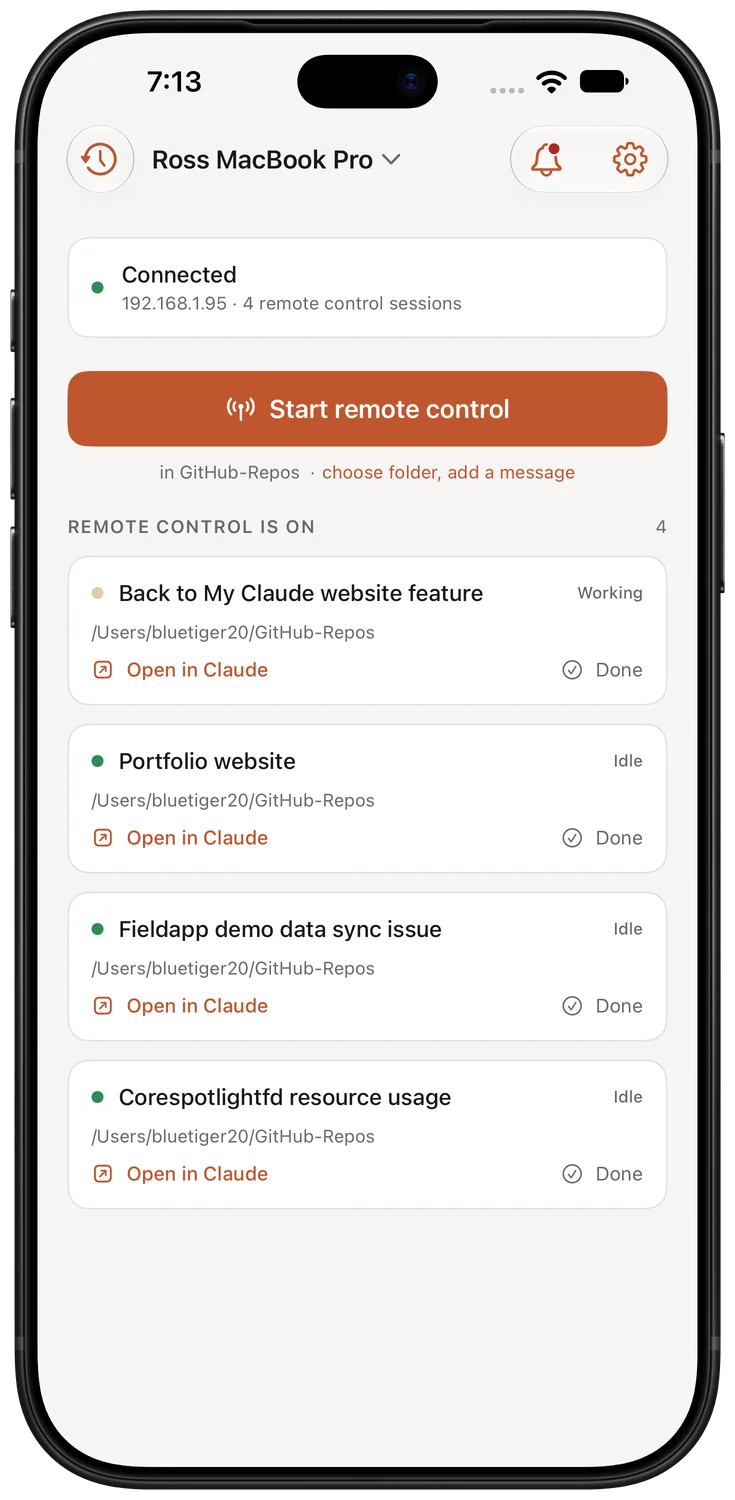
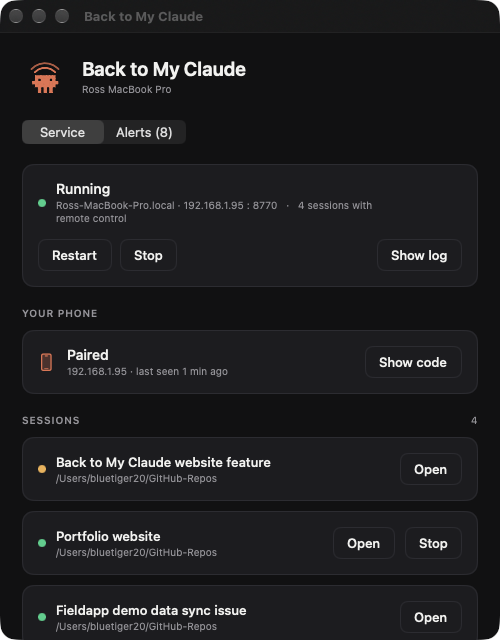
The app I use more than any other, and nobody can download it. I do most of my coding with Claude Code, an AI tool that runs on my Mac and can be driven from my phone, as long as a session was started at the Mac. So a new idea on the couch meant a walk to the desk, and every restart of the tool took the remote sessions with it.
Back to My Claude is one orange button on my iPhone. Tap it and a session starts on my Mac with remote control already on; two seconds later there's a link to open it. It shows what's running, brings back sessions that died, creates a new project folder if the one I want doesn't exist, holds two Macs, and answers to Siri and the Action button. A small Mac app and a tiny background service do the rest, and the whole thing lives on my home network with nothing in the cloud.
Want your own app? It doesn't have to hit the App Store.
Here's what most people don't realize: an app can be built just for you. A private tool that lives only on your own devices — for you, your family, or your team — with no store listing, no reviews, no audience. Just something that does exactly what you want. (And if you do want to publish, I'm a registered Apple Developer and can take it all the way.)
A few I built for myself — to spark ideas of your own:
I built a private dashboard that pulls the things I check every day — systems, smart home, tasks — into one place, synced across my Mac and phone. Imagine yours.
A little app to bookmark exact moments in my shows — episode, timestamp, thumbnail, and a note. The kind of oddly specific tool no store app ever nails.
A tracker or catalog shaped around how you think about your collection, workouts, recipes, or projects — not how some generic app forces you to.
That specific calculator, converter, or one-tap workflow you keep wishing for. If you can describe it, I can probably build it.
How it works
1 · Bring your idea
Even a rough sketch or a "wouldn't it be cool if…" is enough to start. No spec required.
2 · See it take shape
I build a working prototype fast — so you can hold it and react, not just imagine it.
3 · It's yours
Keep it private on your own devices — or, as a registered Apple Developer, I'll take it all the way to the App Store. Your call.